
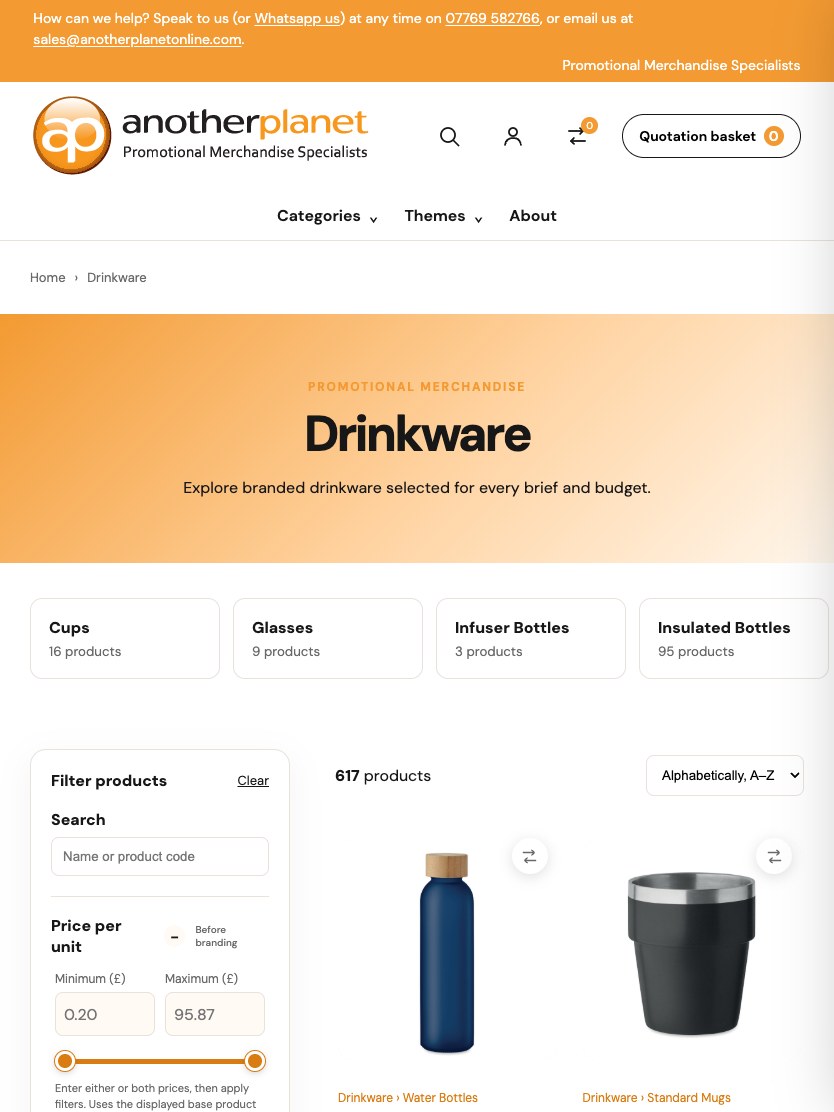

A storefront is only the visible part
Choosing promotional merchandise is rarely a simple add-to-basket transaction. A product has quantities, colours, sizes, decoration methods, artwork and delivery considerations. The customer journey needs to stay understandable while the team works through that detail.
For Another Planet, the build connects the public catalogue with the information and operational tools needed to prepare and progress a quotation. The responsive storefront is one part of a wider application.
Supplier data, made usable
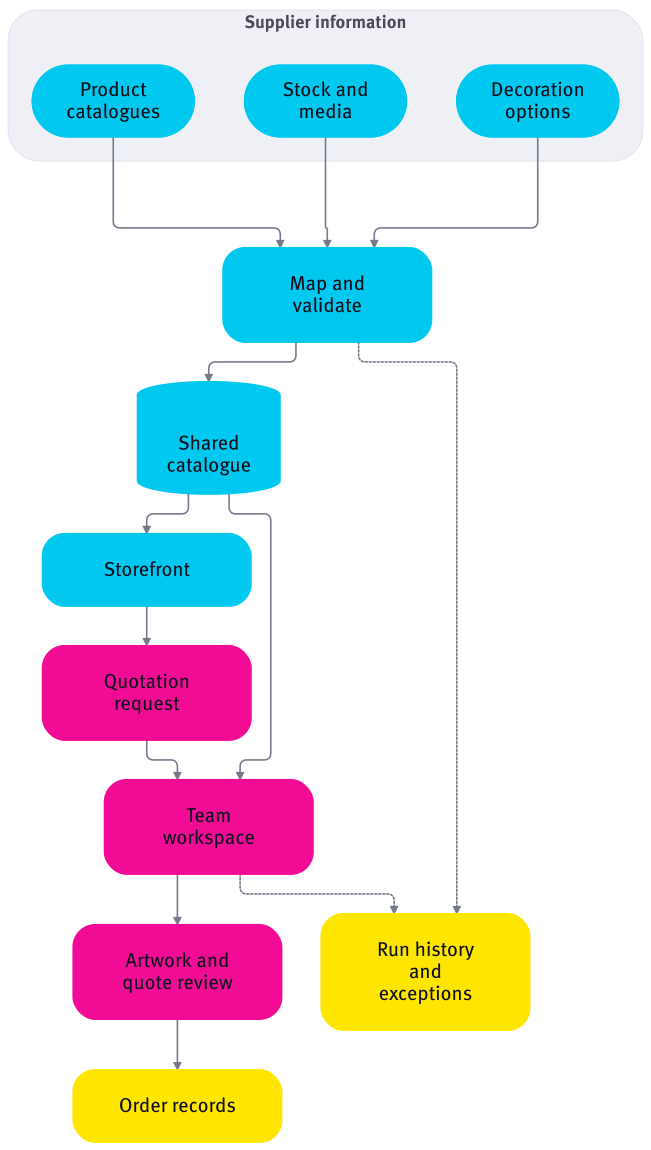
Different suppliers describe products, variants, stock and decoration options in different ways. Source-specific adapters translate that information into a shared catalogue model rather than pushing supplier formats directly into the customer interface.
The import pipeline covers catalogue records, pricing inputs, print options, stock and media, with recorded runs and exceptions. Scheduled updates and operational visibility give the team a way to see what has refreshed and investigate a failed stage.
- A shared product and variant model, with source references retained.
- Category mapping and merchandising controls alongside imported information.
- Separate handling for catalogue, stock, imagery and decoration inputs.
One catalogue. Connected experiences.
Supplier inputs are mapped and validated into a shared catalogue, used by the storefront and operational workspace. Import history and exceptions support review.
Explore the diagram horizontally on a smaller screen.
Pricing that follows the configuration
A catalogue price and a finished branded quotation are different things. Quantity, variant combinations, decoration methods, print locations and carriage all contribute to the work of preparing an offer.
The build includes supplier-aware pricing and decoration inputs, listing-price recalculation and quotation breakdowns. Keeping those responsibilities separate from the page layout allows the customer experience and commercial rules to evolve without becoming the same piece of code.
- Carry the selected product configuration into the quote context.
- Keep supplier-specific inputs behind a consistent application model.
- Review the commercial detail in the operational workspace.
From configuration to reviewed quotation
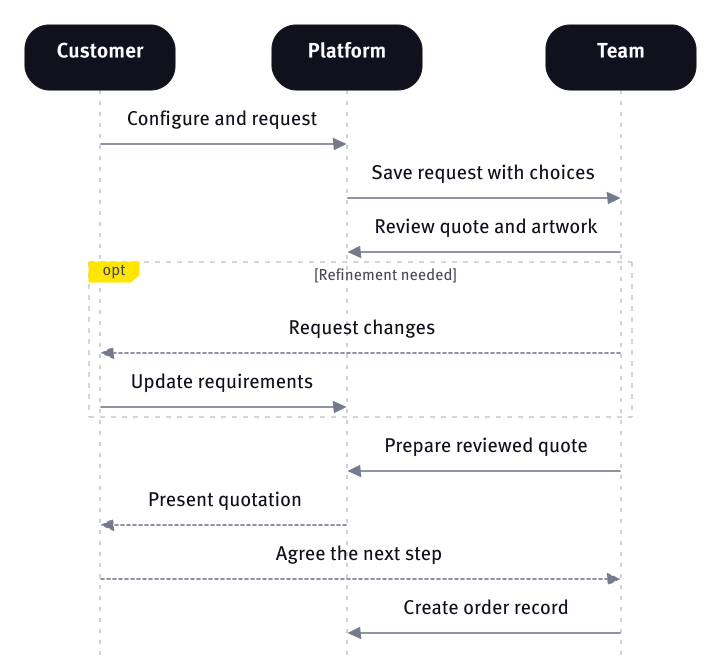
Customers can explore the catalogue, select product requirements and build a quotation request. The operating team works with the corresponding product, variant, decoration and artwork information rather than starting again from a disconnected email.
The build includes an artwork placement tool, a customer logo library and proof-review workflows. Quote preparation and progression into an order record remain controlled application actions. Product presentation, commercial calculations and operational permissions have distinct responsibilities.
- Responsive browsing, search, categories and product detail.
- Quantity, variant and branding configuration carried into quotation work.
- Artwork placement and proof review connected to the quote context.
- Quotation administration and a defined handover into order records.
A quote is a workflow, not just a price.
Product choices become a quotation request. Team review, artwork changes and a reviewed quote precede the controlled creation of an order record.
Explore the diagram horizontally on a smaller screen.
History brought forward with care
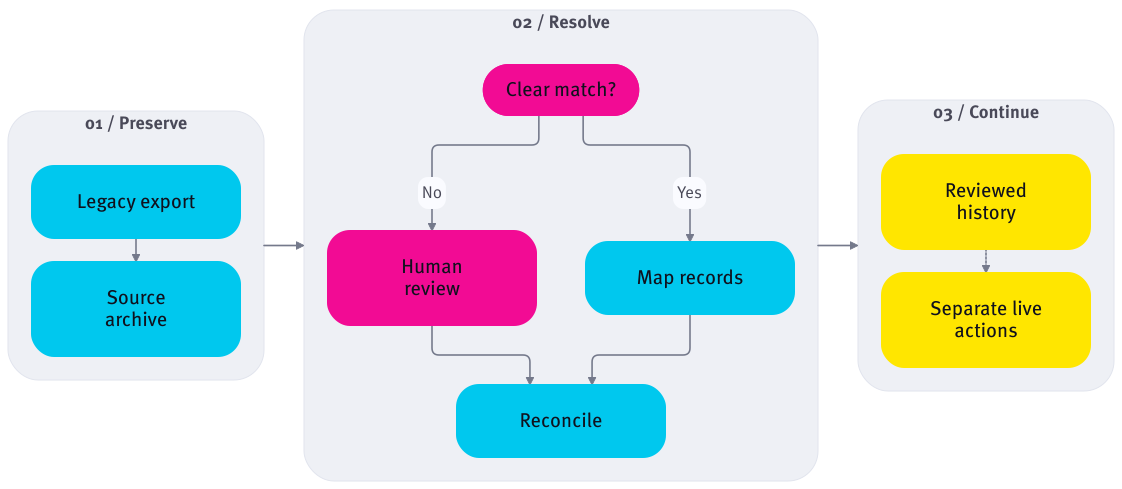
Replacing a working business system also means dealing with its history. Migration tooling preserves original source records and references, then links them to the new model where the relationship is unambiguous. Conflicts and missing relationships stay visible for review.
Historical quotations, orders, invoices, actions and product references can be reviewed without treating old records as new instructions. Reconciliation and deliberate mapping are part of the migration workstream; imported history is kept apart from new live commercial actions.
- Preserve the original export before projecting selected records.
- Retain ambiguous identities for a human decision.
- Reconcile relationships and values without inventing missing business meaning.
- Keep historical records separate from new order and notification workflows.
Bring the history. Preserve its meaning.
Keep the source, map clear relationships, review ambiguity and reconcile records. Historical information stays separate from new live actions.
Explore the diagram horizontally on a smaller screen.
Built for the people running it
The operational workspace brings catalogue controls, enquiries, quotations, order records and import history into one application. The point is to make the next action visible, while keeping restricted commercial information away from the public storefront.
Feedback and release work continue after launch. Merchandising, navigation, configuration and administrative refinements are reviewed as working journeys, with changes checked before production release.
- Laravel application services with a responsive storefront and Filament administration.
- Background jobs for longer-running imports and processing.
- Private artwork/media handling and role-aware operational actions.
- Targeted checks around imports, quotation behaviour, artwork and migration.
A working foundation, with room to evolve
The public platform is live and continues to develop. The delivered codebase brings commerce, integration, artwork and operational workflows together; legacy migration remains a separately reviewed workstream rather than an assumption that every historical record is already live.
This is the practical outcome: a connected platform that can evolve without making every supplier change a storefront rebuild. Additional sources, operational refinements and future integrations can extend the same foundation.
- A consistent route from product discovery into quotation work.
- Shared catalogue information across customer and team experiences.
- Traceable imports and a deliberate approach to legacy data.
- Clear boundaries for the next stage of development.